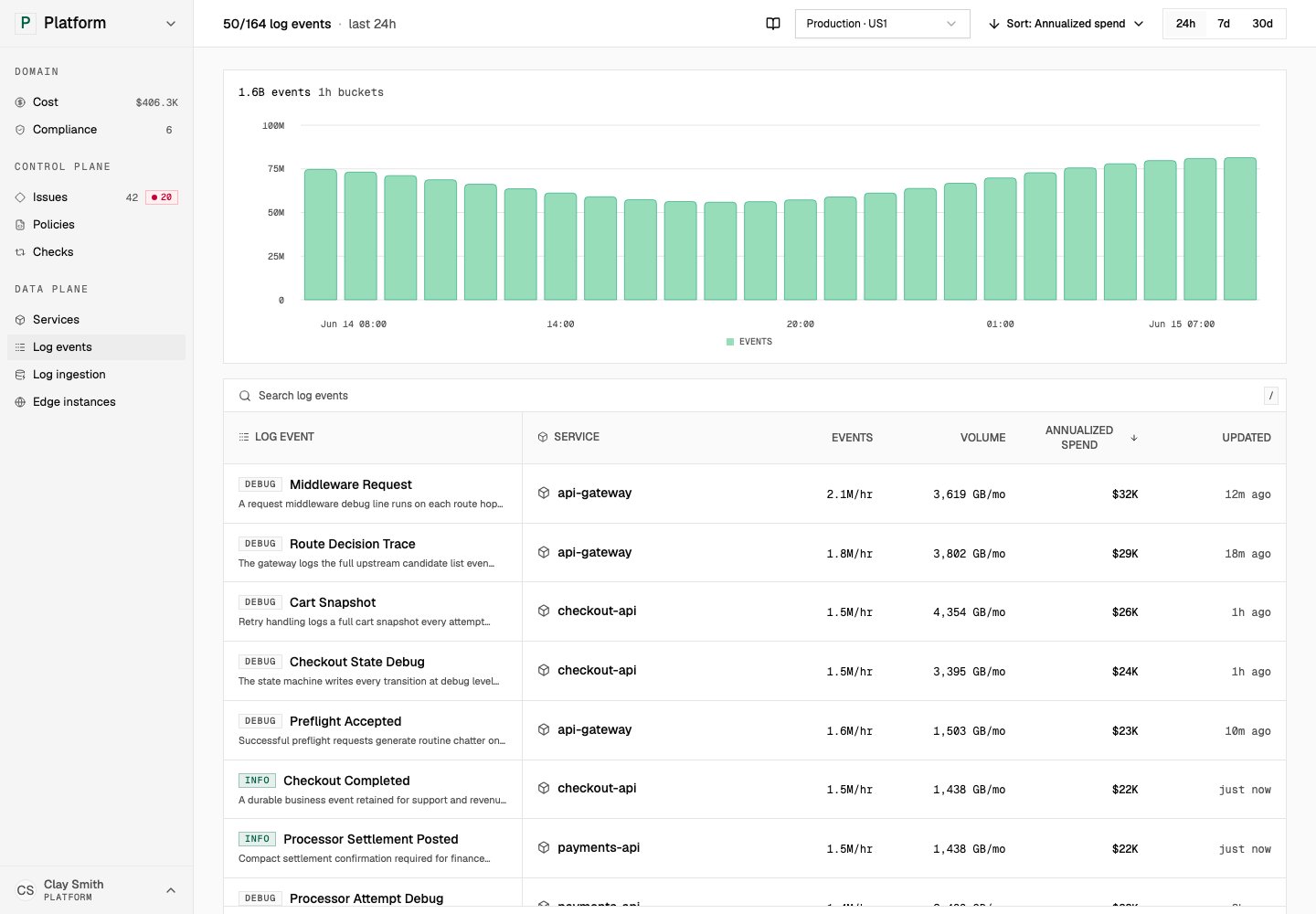
A log event is a grouped pattern of matching log records. Tero uses log events to show service, severity, volume, cost, policies, and related issues for recurring telemetry.
Log events group raw logs into patterns you can review.

Log events group raw logs into patterns you can review. Open in demo

Log event list

The Log events list can show these fields:
FieldDescription
Log eventThe grouped log pattern name or description.
ServiceService that emits the event.
SeverityObserved severity for matching logs.
Event rateHow often matching logs arrive.
VolumeTotal observed log volume over the selected window.
CostEstimated annualized cost for the event.
UpdatedMost recent update time.
Datadog-scoped accounts can inspect 24-hour, 7-day, and 30-day log-volume windows.

Log event detail

Log event detail pages show the event in context. Current detail tabs include overview, policies, and issues.
Detail areaDescription
OverviewService, volume, cost, and event summary.
PoliciesPolicies attached to the event.
IssuesIssues related to the event.

Relationship to issues

Issues use log events as evidence when a finding concerns a recurring log pattern. A cost issue may point to a high-volume event, while a compliance issue may point to an event that carries sensitive fields. A policy recommendation may match a specific log event so the runtime can drop, sample, redact, or transform it.