> ## Documentation Index
> Fetch the complete documentation index at: https://docs.usetero.com/llms.txt
> Use this file to discover all available pages before exploring further.
# Policies
> Reviewable control-plane artifacts
Policies are the control-plane artifacts Tero uses to turn issue evidence into runtime action.
A policy states which telemetry it matches and what action the runtime should take. Tero presents policies for review with status, source, action, service, recent activity, linked issue, deployment state, and spec.
Track the upstream OpenTelemetry specification proposal for telemetry policy.
{/* screenshot-generated id: policies-table */}
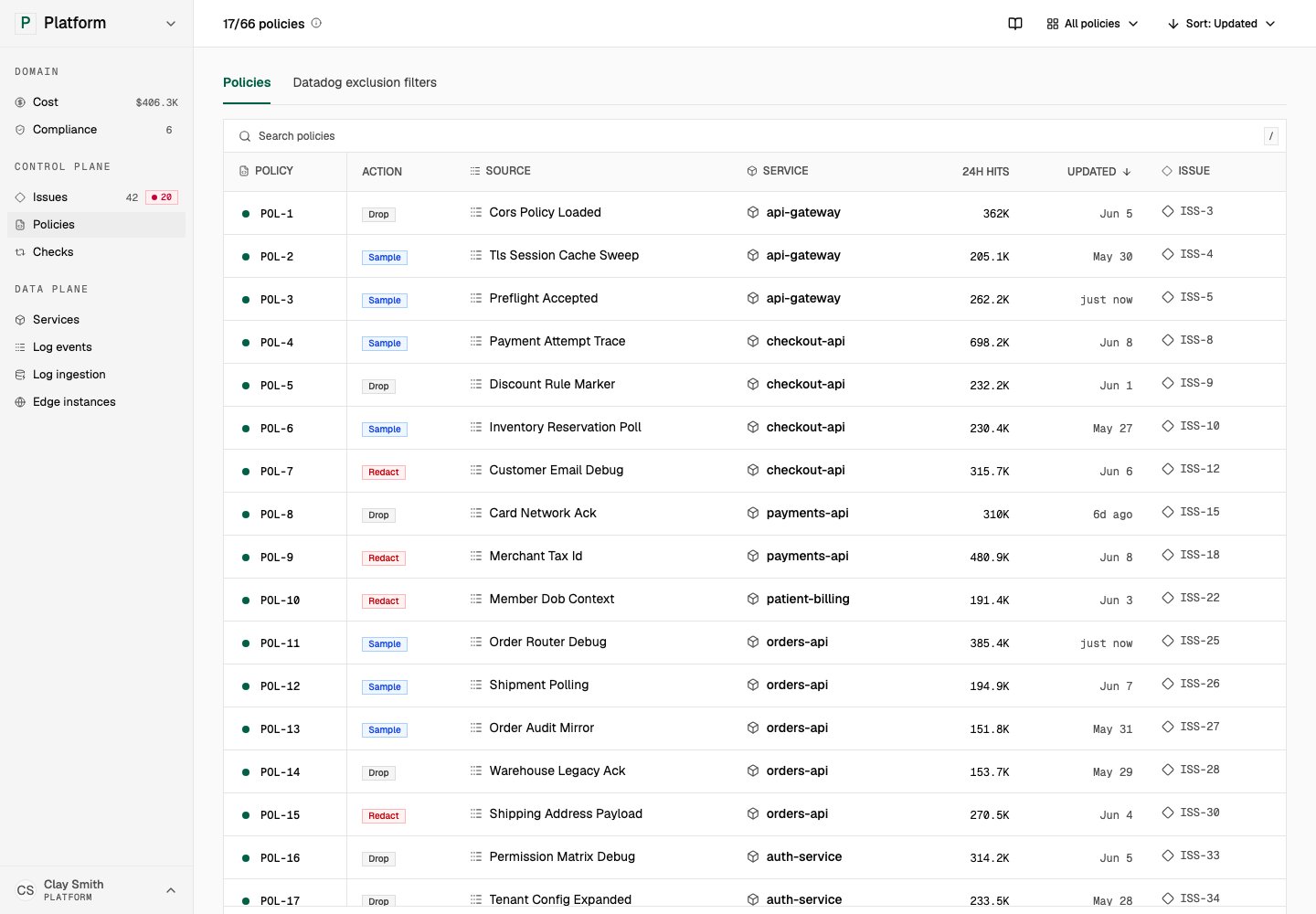
Policies show status, action, source, service, activity, and linked issue. Open in demo
## How policies relate to issues
Tero starts with a finding. The issue explains what Tero found and shows evidence. If a policy can address the issue, Tero presents the recommended policy in issue detail.
After approval or deployment, Tero adds the policy to the Policies workspace. You can open the policy to inspect its identity, source, related issue, activity, deployments, and spec.
Tero links each policy to the issue that produced it, so reviewers can check the evidence before approving.
## Policy actions
Policy actions describe what the runtime should do to matching telemetry. Common actions include dropping a matching event, sampling a subset, redacting sensitive values, rewriting fields, or trimming large payloads.
For lookup details, use [Policy lifecycle](/policies/lifecycle) and [Policy categories](/policies/categories/overview).
## Policy states
Policies move through review, deployment, and impact checks. Tero shows policy state, source, linked issue, activity, deployments, and spec so reviewers can connect the policy back to the evidence Tero used to create it.
Use [Policy lifecycle](/policies/lifecycle) for the current state reference.
## Policy detail
Policy detail pages include:
* **Overview**: identity, source, linked issue, hits over time, and activity
* **Deployments**: where the policy runs, including Edge deployment state when present
* **Spec**: the structured policy definition Tero and runtimes use
{/* screenshot-generated id: policy-detail-overview */}
Policy detail connects spec, activity, linked issue, and deployments. Open in demo
The issue link returns you to the evidence. Open Deployments for runtime state, or Spec for the exact match and action.
## Provider inventory
The Policies workspace can also show Datadog exclusion filters. This inventory helps teams compare existing provider configuration with Tero policies and convert supported filters into policies.
Datadog filter detail can show overview, policy preview, imported policies, and import readiness.
## Related pages
* [Review an issue](/issues/review-an-issue)
* [Policy lifecycle](/policies/lifecycle)
* [Policy categories](/policies/categories/overview)
* [Policy enforcement](/policies/enforcement/overview)
* [Datadog integration](/integrations/datadog)